Tuesday, April 23, 2013
April 24

How to do research.
Today we are going to look at a cool site from the USA (Kentucky virtual library) which is so cool and teaches everything you need to know about research. It's awesome.
http://www.kyvl.org/kids/homebase.html
Today we will go through the website and next lesson we will answer some questions.
Let's go.

Sunday, April 14, 2013
April 15, 22
 |
| http://covers.openlibrary.org/b/id/2573082-M.jpg |
Our final product will be a "Voicethread". Each of you will create a poster which we will photograph and upload to a Voicethread. You will offer advice to other tweens about good digital citizenship.
Year 6 here we go.
Open a Word 2013 docuemnt.
Type your name in the upper left hand corner.
Double space, then type INVESTIGATE font size 12 (center it)
Double space, then type 1. Identify the Problem font size 12 (left justify)
Great, now let's recap what goes into the paragraph.
State the problem,
Restate (say again in your own words) the problem,
Say why we are doing this project,
Say who our "customer" is,
Connect our project to Health and Social Education.
IB Learner Profile - Inquirer
Tuesday, April 9, 2013
April 10

Auriane, Jaime, Manuel, and Sebastião please see me and I will give you a temporary password to enter the OIS Cloud.
Next Unit of Work - Digital Citizenship
Title: Digital Citizenship - Rights, Roles and Responsibilities in a Digital Society
Unit Question: How can I become a responsible digital citizen?
AOI: Health & Social Education
Big Concept: Students will collect knowledge and information to make informed decisions when using ICT (Information and Communication Technology).
You will create a poster (paper or computer - you will vote), save it as an image, upload it to Voicethread and advise others of their rights, roles and responsibilities of a digital citizen.
http://pbskids.org/webonauts/
Friday, April 5, 2013
April 8
 |
I. Let's try to log into Office 365. Follow these instructions:
To work in the cloud please follow these steps to success:
1. login.microsoftonline.com
2. insert username/password (EXAMPLE: john.doe@student.oeirasinternationalschool.com)
3. Team Site
4. My Cloud
5. My Content
II.Term 2 was full of fun and you learned a lot about Microsoft Word 2013 and how to create a PDF file. Let's look at our final results which are located on a wiki: http://whatscookin1.pbworks.com. Should I include the name of the recipe near your names????? Vote on the poll in the sidebar.
III.Now, let's talk about our next project:
Title: Digital Citizenship - Rights, Roles and Responsibilities in a Digital Society
Unit Question: How can I become a responsible digital citizen?
AOI: Health & Social Education
Big Concept: Students will collect knowledge and information to make informed decisions when using ICT (Information and Communication Technology).
You will create a poster (paper or computer - you vote), save it as an image, upload it to Voicethread and inform others of rights, roles and responsibilities of a digital citizen.
http://pbskids.org/webonauts/
image: http://freshmancourse.wikispaces.com/file/view/digital%20citizenship%20logo.jpg/358602709/digital%20citizenship%20logo.jpg
Saturday, March 16, 2013
March 18, 19
 |
| https://betalabs.nokia.com/sites/default/files/iStock_000012753624XSmall.jpg |
Year 6, we are almost finished with this project.
Be sure to answer all the questions on your Evaluate worksheet. Remember to include how you will improve your performance next term.
Sunday, March 10, 2013
March 11, 13
Year 6, the first task in the Evaluate-Criterion E is to gather feedback on your product.
Print your questionnaire, then let's present our recipe flyer to obtain lots of feedback.
IB Learner Profile: Reflective
Learning objective: carry out tests to evaluate the product/solution against the design specification; evaluate their perforance at each stage of the design cycle and suggest ways in which their perforance could be improved; evaluate the impact of the product/solution on individuals and/or society.
Print your questionnaire, then let's present our recipe flyer to obtain lots of feedback.
 |
| http://images.zap2it.com/images/tv-EP01215557/best-recipes-ever-12.jpg |
IB Learner Profile: Reflective
Learning objective: carry out tests to evaluate the product/solution against the design specification; evaluate their perforance at each stage of the design cycle and suggest ways in which their perforance could be improved; evaluate the impact of the product/solution on individuals and/or society.
Sunday, March 3, 2013
March 4

Year 6, we are almost done. Let's take one more lesson to complete our recipe flyers and submit them.
If you have already finished, please see me. I have a project that I need help with!!!
IB Learner Profile: Knowledgable
Learning Objective: Understand the importance of a plan, and follow the plan to produce a product/solution of appropriate quality.
Saturday, February 23, 2013
February 25, 27, March 1
 |
| https://blogger.googleusercontent.com/img/b/R29vZ2xl/AVvXsEgeLjoXY51xUp5AKOqr1YgIcvDZxG-FXQYJqP_D5JItYIw-xiWty4QmRZys0QtXY2WZib_CErpf506r3VEmrpd2N2yv-Fp3EBCB_3HMAwOeWqxanXi8nR2QE6kITnyGb8cJ4g_pG1Am65U/s1600/Recipe+card+Snickers+cookies.jpg |
1. Typing Practice - 15 minutes
2. Next, on to the CREATE - Criterion D (Maximum 6 points).
- a.Follow the plan you made to create your product (recipe flyer).
- b.Then write a paragraph saying whether your plan worked EXACTLY. Since you are beginners at making production plans, many things could go wrong. Did you leave out any important steps? Was the actual time to produce each step different from your estimated time? Be sure to record any modifications (changes) you made to your plan. Say what you changed and why you made the change;-)
IB Learner Profile: Knowledgable
Learning Objective: Understand the importance of a plan, and follow the plan to produce a product/solution of appropriate quality.
Friday, February 15, 2013
February 18, 19

Year 6 let's move on to the PLAN - Criterion C
1. Open a Word 2013 document,
2. Type your name at the top of the page,
3. Space down and type: PLAN (center justified),
4. Space down and type: Resources,
Let's brainstorm the resources each of you will need to create your recipe flyer.
5. Type the list of resources that we have created,
6. Space down and type: Plan,
7. Open Word 2013
8. Begin to create a list of the steps you will need to take to create your recipe flyer.
1. Open Word 2013, 1 min
2. Insert pink background, 1 min
3. Insert . . .
Continue on until you have included all the information and pictures necessary to complete your recipe flyer.
Let's go!
Due date: Tuesday, February 19
IB Learner Profile: Thinker
Learning objectives: develop a basic timeline and write instructions for making the recipe flyer.
Monday, January 28, 2013
January 29, February 4, 6, 8

Today we will focus on the DESIGN - Criterion B Maximum 6 points
According to the IBO:
Students are expected to generate more than two feasible designs that meet the design specification and to evaluate these against the design specification.
Students are then expected to select one design, justify their choice and evaluate this in detail against the design specification.
To get a 5-6: The student generates more than two designs and selects one with several reasons. The student attempts to explain how his/her design meets his/her specifications.
2. Using paper and pencil (colored pencils/crayons/markers) you will create 3 different designs.
Insert text boxes but NOT the text for your recipe.
REMEMBER: all your information (complete recipe, 3 interesting facts, what it means to my family, image AND your first name and tutor group) must fit on the recipe flyer.
Look at an example of what we will be creating: http://year7cookbook.pbworks.com/w/page/27257033/What%27s%20Cookin%27
IB Learner Profile - Risk Taker
Learning objective: create designs and communicate them.
Saturday, January 26, 2013
January 28
 |
| http://www.pallareviews.com/wp-content/uploads/2012/35297e83fe0f_600F/ribbon_interface_office_2013.jpg |
Vocabulary that will be helpful when speaking about Microsoft Office 2013:
Ribbon, Tab, Group
Now explore Word 2013. You need to be able to do the following:
- Change background colour,
- Change font,
- Change font size,
- Change font colour,
- Insert a picture
- Insert a shape
- Insert a text box
- Insert a hyperlink
Let's go!
IB Learner Profile: Inquirer
Sunday, January 20, 2013
January 21, 23, 25
 |
| http://www.fightbac.org/storage/documents/kids_activities/recipes_coloring_page.gif |
Happy Monday Year 6. This week we have to finish our Investigate Worksheet.
1. 15 minutes typing,
2. Finish the following on your worksheet:
6. List the resources that you used here:
7. List 3 Design Specifications here:
8. Create a test to evaluate your recipe flyer.
That's all there is to it:-)
PS: you can print the image from this page and colour it:-)
IB Learner Profile: Inquirer
Learning Objective - The student will: understand the concept and importance of the design specification and, with guidance, list the requirements that must be met by the product/solution; understand the importance of testing to determine the success of the product/solution and, with guidance, design some simple tests.
Saturday, January 12, 2013
January 14, 15
 |
| http://carolinaliving.com/images/cl_recipe_1.jpg |
Good Morning Year 6!
1. 15 minutes typing
2. Investigate Worksheet
Today,
- Complete any unfinished work from Friday,
- Continue researching using the Investigate Worksheet
IB Learner Profile: Inquirer
Learning Objectives - The student will: with guidance, identify appropriate sources of information and acknowledge these in a suitable format; with guidance use different systematic methods to collect and select information, and to organize it logically; understand the importance of questioning the value of sources of information.
Thursday, January 10, 2013
January 11

1. 15 minutes typing
2. Investigate worksheet,
Well done Year 6. Now we are on to the 2nd stage of the Investigate: Develop A Design Brief.
Decide which recipe that means something to you and your family that you would like to share with the class.
Then do a "keyword" search on Google.com to find your recipe in English.
For example: bolo chocolate recipe in English
bolo de coco recipe in English
coq au vin recipe in English (Try this and see what happens:-)
Today:
a. decide on a recipe
b. copy/paste the recipe to an open office document
c. save document
d. print document, staple it to your Term 2 Investigate worksheet
IB Learner Profile - Inquirer
Monday, January 7, 2013
January 7, 9
2 ) Unit Introduction - let's look at the Unit of Work
3) Let's begin the Identify the Problem
Answer questions 1-4.
IB Learner Profiles - Inquirer
Learning objective - The student will: understand the concept of a design brief and adapt a given design brief to the problem or, with guidance, start to develop a design brief.
Monday, December 17, 2012
December 18
 |
| http://www.hilltopgardencentre.co.uk/images/products/39cm-its-christmas-time-sign-fEiB.jpg |
Can you follow a plan? Let's see. Let's create a Kirigami snowflake project and/or a Christmas Tree origami project.
 1. Kirigami Snowflake Instructions
 1.Fold a piece of paper in half.
2.Fold in half again but only make a small crease to show the midpoint. Fold the bottom right corner upwards to make a 60° angle at the midpoint (begin to fold into thirds).
3.Fold the bottom left corner upwards to meet with the folded right-edge of the paper.
4.Trim the excess paper to form a cone shape.
5.Make several cuts out of the cone shape and then unfold to discover your paper snowflake. Be careful not to cut too much - that will cause the entire snowflake to fall apart.
Note that cutting half-a-heart will open to reveal a heart cutout. Similarly, cutting a semicircle will reveal a circle; and cutting a triangle will produced a diamond shape.
2.Christmas Tree Origami

3. Send an e-card: http://www.care2.com/ecards/
Norad Tracks Santa - this is a really nice site with lots of activities for kids: http://www.noradsanta.org ,
The Fun Christmas Site For Kids - lots of possibilities including recipes, crossword puzzles, Christmas hangman, word scrambles and more . . . http://www.topshelfmarketing.com/christmas/ ,
Christmas Printable Worksheets - more anagrams, crosswords, cryptograms, sudoku, http://www.dltk-holidays.com/xmas/worksheets.htm
I think this will keep you busy for a while.
Happy holidays one and all. See you in 2013!!!!
Sunday, December 16, 2012
December 17
 |
| http://rlv.zcache.com/i_do_i_did_im_done_binder-p127948495039026250b7ven_400.jpg |
1. 15 minutes typing
2. Are we all done yet????? If no, finish, If yes, it's time for Christmas activities (Hooray!)
Sunday, December 9, 2012
December 10, 12, 14
 |
| http://foodstorageandbeyond.com/wp-content/uploads/2010/09/evaluate-adjust.jpg |
Feedback - Gathering feedback is an important part of evaluating any project.
Today we are going to gather feedback on our Design Cycle door hanger.
1. Show your Design Cycle door hanger to 5 classmates and ask them to answer the questions you made in the Investigate step.
2. Then write about what your classmates said about your door hanger. (Did it meet your design specifications? Why or why not?) Also say how you could improve your cartoon.
3.. Evaluate your own performance in the Investigate, Design, Plan, Create stages of the Design Cycle.
4. Draw a picture to say if you have completed your unit goal.
IB Learner Profile: Reflective
Learning objective: The student will: carry out tests to compare the product/solution against the design specification; consider the success of the product/solution based on testing; consider the impact of the product/solution on the OIS community; explain how the product/solution could be improved.
Tuesday, November 27, 2012
November 28, 30, December 3
 |
| http://godsgardening.files.wordpress.com/2012/01/create_1.jpg |
1. Open Open Office Impress/Presenter
2. Use you chosen design and create your Design Cycle poster.
Learning Objective: Understand the importance of a plan, and follow the plan to produce a product/solution of appropriate quality.
Saturday, November 17, 2012
November 19, 20, 26
Year 6, let's begin again.
 |
Year 6, now we are on a roll. Let's continue . . .
IB Learner Profile: Risk-taker
Learning objectives: develop a basic timeline and write instructions for making the design cycle poster.
Wednesday, November 14, 2012
November 16
 |
| https://blogger.googleusercontent.com/img/b/R29vZ2xl/AVvXsEgf9X9TOSIL2of31YTCUNKdU0mt8dFz0ZJgnc8He0X5P4V46Xt35Sv0jXwPdGOZIIWX1CzuWvyvEqJMK8vgNQiAxiW37Bmv8Hqwf0wNpwvjvkip23Tk-cGPYMzFE1E5CO3fqYJ4PRZlu7iJ/s1600/PlanB.jpg |
1. 15 minutes typing practice
2. You may visit each of the web sites below:
IXL ( a Maths website with cool activities) - http://www.ixl.com/math/grade-5
Funbrain ( lots of different topics that kids like) - http://www.funbrain.com/
BBC (even more stuff) - http://www.bbc.co.uk/children/
PBS (Public Broadcasting System) - http://www.bbc.co.uk/children/
Remember to be on your best behaviour and only use these links.
Have a great weekend and see you Monday!
Monday, November 5, 2012
November 6, 12, 14

1. 15 minutes typing (if you haven't finished your designs please finish designs)
2. Year 6 it all begins with a plan!
1. Resources: Computer, OpenOffice Presentation, Design Specification, Chosen Design.
2. Now, make a step-by-step plan of what you will do to create your poster using Open Office Presenter (or Open Office Impress 2010) AND estimate how long it will take you.
Example:
1. Open Open Office Presentation, 1 minute
2. Select Page Layout and change the Orientation to Landscape, 1 minute
Continue on until you have completed all the steps you think you will need and the time that it will take you. (You may open Open Office and practice while you are making the plan.)
Finish your step by step plan.
Write a paragraph saying why you think your plan will work. Include the fact that you have done a tutorial and have had experience using Open Office;-)
IB Learner Profile - Knowledgeable
Learning objectives: devleop a basic time line and write instructions for making the product/solution.
2. Now, make a step-by-step plan of what you will do to create your poster using Open Office Presenter (or Open Office Impress 2010) AND estimate how long it will take you.
Example:
1. Open Open Office Presentation, 1 minute
2. Select Page Layout and change the Orientation to Landscape, 1 minute
Continue on until you have completed all the steps you think you will need and the time that it will take you. (You may open Open Office and practice while you are making the plan.)
Finish your step by step plan.
Write a paragraph saying why you think your plan will work. Include the fact that you have done a tutorial and have had experience using Open Office;-)
IB Learner Profile - Knowledgeable
Learning objectives: devleop a basic time line and write instructions for making the product/solution.
November 5
 |
| http://www.thekosherchannel.com/images/flourless-chocolate-cake.jpg |
1. 15 minutes typing, then
2. Plan - Criterion C (maximum 6)
- What is the "Plan" stage of the MYP Design Cycle? According to the MYP, "Students are expected to construct a plan to create their chosen product/solution that has a series of logical steps, and that makes effective use of resources and time. Students are expected to evaluate the plan and justify any modifications to the design."
Task:
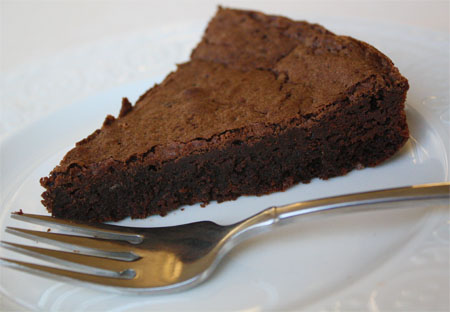
First, let's look at the coloured strips of paper. They consist of a yummy recipe for chocolate cake. We will work in pairs and put the strips of paper in order.
Next, we will glue the strips onto paper.
Well done Year 6. You have created a production plan for making a yummy chocolate cake;-)
IB Learner Profile: Thinker
Learning Objectives - The student will be able to correctly order the steps needed to make a chocolate cake (The student will be able to correctly order the steps needed to create a product/solution).
Thursday, October 25, 2012
October 26
 |
| http://holidays.mrdonn.org/banner_halloween.gif |
There's a nice site called Kaboose. Check it out here: http://funschool.kaboose.com/fun-blaster/halloween/
Have a wonderful break.
Saturday, October 20, 2012
October 22, 24
 |
| http://upload.wikimedia.org/wikipedia/commons/thumb/e/ee/Apache_OpenOffice_3.4_Start_Center.png/300px-Apache_OpenOffice_3.4_Start_Center.png |
1. 15 minutes typing,
2. Today, we will look at a tutorial for Open Office Impress and then practice our skills.
http://presentationsoft.about.com/od/openofficeimpress/tp/071021openoffice_beginguide.htm
Here's another site to visit for a tutorial.
http://www.tutorialsforopenoffice.org/category_index/presentation.html
IB Learner Profile: Risk-taker
Learning Objective: The student will learn new skills.
Saturday, October 13, 2012
October 15, 16
 |
| http://jacopofarina.files.wordpress.com/2008/09/design-is-all-about-colors-and-shapes.png |
Year 6
1. 15 minutes Typing
2. Let's finish the Design;-)
Design Specification: includes all 5 steps, colourful, kid-friendly
a. Look at each design and make sure that it has all 5 steps in the correct order, is colourful and is kid-friendly.
b. On each design write the following: Design 1 (or 2, or 3) meets my design specification because it includes all 5 steps, is colourful and is kid-friendly.
c. Look at each design. Choose the design you are going to make. Write a few sentences saying which design you will ultimately make. (You can start like this: I will use Design 1 to make my poster because . . .)
Learning Objective: The student will create designs and communicate them using different forms and conventions, and compare the designs against the design specification.
Monday, October 1, 2012
October 2, 8, 10, 12
 |
| http://blog.echoenduring.com/wp-content/uploads/2010/05/what-is-design.jpg |
1. 15 minute typing
2. On to the DESIGN - Criterion B - maximum 6 points

Youu are to make 3 possible designs that meet the design specification using paper and markers. Then you will evaluate each against the design specification.
Remember Design Specification: includes all 5 stages of the design cycle, colourful, kid-friendly;-)
INVESTIGATE, DESIGN, PLAN, CREATE, EVALUATE
Name them Design 1, Design 2 and Design 3.
Make sure your name is on each design.
Then, evaluate both against the design specification. (*Example: Design 1 meets the design specification because it includes all 5 stages of the design cycle, is colourful, and is kid-friendly.)
Learning Objective: The student will create designs and communicate them using different forms and conventions, and compare the designs against the design specification.
Thursday, September 27, 2012
September 28, October 1
 |
| http://www.cmgray.co.uk/wp-content/gallery/pattern/Walpole%20Flagpole%20Design%20Specification%203.jpg |
Year 6, we are almost finished with the Investigation. Now, we need to make a test to evaluate our product
1) Let's look at the poll and answer the question about Halloween.
2) Next, we will talk about the words: survey and questionnaire to understand what they are and discuss when they are used.. We will translate these words into your first language.
3) Then, we will make a questionnaire to test our poster. We will create 1 question for each design specification. (For example: Does my poster have all 5 steps?)
4)We will make a rating scale. For example: on a scale of 1 to 5, 1 = awful and 5 = awesome.
5) 15 minutes typing practice.
.
IB Learner Profile: Inquirer
Learning objectives: practice typing to increase proficiency, to develop organizational skills, to develop a simple design brief with guidance.
Tuesday, September 25, 2012
September 26
 |
| http://www.technologystudent.com/images4/specy3.jpg
|
Year 6, what is a Design Specification?
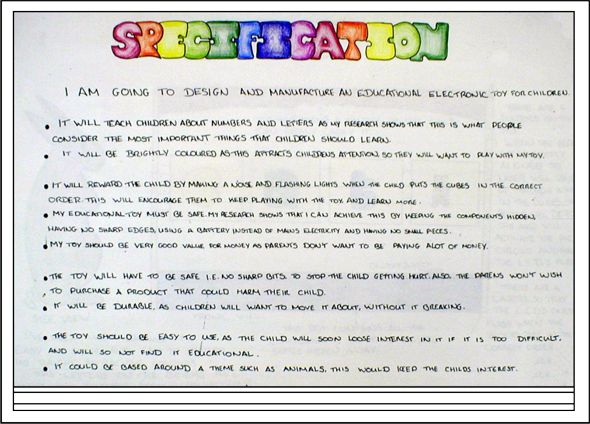
According to Wikipedia, a Design Specification provides information about the requirements for a product and how the product is to be put together.
1. Today we will talk about Design Specifications and the kinds of Design Specifications that would work well for our project.
2. Then, you will look at the MYP Design Cycle infographic and find the 3 Design Specifications that we will use for our project. You will fill this information in on the Investigate Worksheet (number 7).
3. You will create 1 Design Specification yourself and include this information on the Investigate Worksheet (number 8).
4. Finally, you will practice your typing on the typing site.
IB Learner Profile: Inquirer
Learning objectives: practice typing to increase proficiency, to develop organizational skills, to develop a simple design brief with guidance.
Sunday, September 23, 2012
September 24

Year 6, I hope you had a great weekend and are ready to continue documenting our project.
1. Let's continue learning about the MYP Design Cycle with our worksheet, then
2. 15 minutes typing practice.
IB Learner Profile: Inquirer
Learning objectives: practice typing to increase proficiency, to develop organizational skills, to develop a simple design brief with guidance.
Monday, September 17, 2012
September 18

Yoohoo Year 6, you did really good work on Monday!
1. Let's continue learning about the MYP Design Cycle with our worksheet, then
2. 15 minutes typing practice.
IB Learner Profile: Inquirer
Learning objectives: practice typing to increase proficiency, to develop organizational skills, to develop a simple design brief with guidance.
Sunday, September 16, 2012
September 17

Year 6, Remember the Design Cycle has 3 tasks: 1: Identify the Problem, 2: Develop a Design Brief, and 3: Formulate a Design Specification.
1) Today let's work on the second task: Develop A Design Brief.
This is the part of the project where we do research that will help us "solve" our unit problem.
Let's work on this task until 11:50.
2) Typing (11:50 - 12:08).
IB Learner Profile: Inquirer
Learning objectives: practice typing to increase proficiency, to develop organizational skills, to develop a simple design brief with guidance.
Wednesday, September 12, 2012
September 12, 14
 |
| https://blogger.googleusercontent.com/img/b/R29vZ2xl/AVvXsEgHGRdoBXQ3ACGS8OZ3f9e3zFvm89VvsmQKeqt4cuNHEOCeBi-NfpVyfn84nKnVITrCn5rxjPsVJiVT33cwc6vuI_3UxI71FIkRoD05DJghvEBM9ZamtZGf0tMwophSrz3GxH1oQ9JBtl8/s1600/LetsGoLogo.jpg |
then
Year 6, We are ready to start our project.
Our unit question is: How can I use Computer Technology to teach other about the MYP Design Cycle?
You have received your Investigate Worksheet so we can begin learning about the MYP Design Cycle and documenting our work.
Let's look at the Information Sheet that is located below:


IB Learner Profile: Inquirer
Learning objective - The student will: understand the concept of a design brief and adapt a given design brief to the problem or, with guidance, start to develop a design brief. Students will (A3) ask useful questions about the investigation and (A6) understand the importance of questioning the value of sources of information.
September 10

My name is Ms. Dietrich and I will be your teacher for the entire year.
Let's take this period to:
- get acquainted,
- talk about expectations, and
- make a list of rules.
We will talk about the Design Cycle and how it is used to help solve problem.
Let's go!
September 3, 4
My name is Ms. Dietrich and I will be your teacher for the entire year.
Let's take this period to:
- get acquainted,
- talk about expectations, and
- make a list of rules.
We will talk about the Design Cycle and how it is used to help solve problem.
Let's go!
Subscribe to:
Posts (Atom)